Instructions for accessing SPOT reports and supporting faculty review processes
SPOT data access and use
SPOT data access and use
- DEOs and departmental administrators have access to pull multi-semester reports of quantitative SPOT data (numerical ratings).
- SPOT reports obtained by the departmental administrator through the SPOT Report Dashboard are used for all faculty promotion reviews and tenure-track third-year probationary reviews.
How to pull SPOT reports
How to pull SPOT reports
Log in to the Campus Data Portal

Click Find and search spot

Select SPOT Reporting
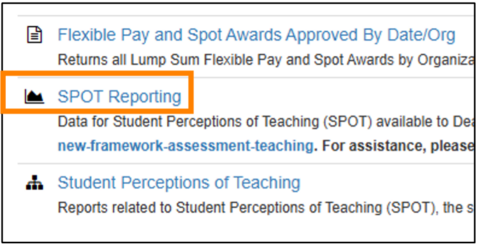
At the bottom, select Multi-Sem. Summary

In the filters at the top, select the following:
Semester: All (or the period of the promotion/review)
College: College of Liberal Arts and Sciences
Acad Org Unit Name: your department
Course/Course Section/Course Level: All
Question: All
Instructor Name: faculty member’s name
- Instructor Role: primary instructor (or other role, if appropriate)
Once data has filtered, click the three dots in the top right corner and Export data

Additional information
Additional information
- Departmental administrators may request access to the SPOT Reporting Dashboard through this Workflow form.
- The column titled “Surveys sent” demonstrates enrollment at the end of the semester.
CLAS SPOT guidance
Learn how SPOT surveys are used in CLAS courses.
UI SPOT resources
Review UI SPOT policies, procedures, and support resources.
Info for instructors
Learn how to access your SPOT survey responses and schedule midterm surveys.